
Grind by weight (beta)
Grind by weight turns your Slow Feeder into a dosing feeder. It connects to a Bluetooth scale under the grinder’s cup and feeds beans until the ground coffee in the cup reaches your target, typically within ±0.1 g in 30 to 70 seconds. It measures your grinder by itself, so no calibration is needed.
What you need
Section titled “What you need”- Slow Feeder: Metal (all waves), Ultra or Pro V2. Metal Wave 1 & 2 have their own beta with dial controls, see Slow Feeder Metal Wave 1 & 2. Not the Pro V1. Which feeder do I have?
- Scale: BOOKOO Themis or Themis Mini (tested). Acaia Bluetooth scales (Lunar, Pearl, Pearl S, Pyxis, Cinco, Umbra) work experimentally: built from Acaia’s published protocol, not yet tested by us with a real Acaia scale. Set the scale to grams. Other scales are not supported.
- Phone page (optional): Chrome on Android, Windows or Mac. On iPhone / iPad, the free Bluefy browser (Safari can’t use Bluetooth from a web page).
- Grinder: any grinder the Slow Feeder fits. Grinders with an automatic switch-off (e.g. Timemore, about 60 s) can stop during long doses, see If something goes wrong.
Install the beta firmware
Section titled “Install the beta firmware”Pick your feeder, then either download the file for a Wi-Fi update (OTA) or click USB-C flash to install it straight from this page. The stable firmware is right next to it, in case you want to go back.
Grind by Weight beta
Metal Wave 3+ · Ultra · Pro V2
Release notes
- Stable 2.2 plus grind by weight
- Shows as v2.3-GBW-beta on the update page
Download 2.3_GBW beta (OTA)
Back to stable
Metal Wave 3+ · Ultra · Pro V2
Release notes
- The current stable firmware, without grind by weight
- Shows as v2.2.7 on the update page
Download v2.2 (OTA)
Over Wi-Fi (OTA):
-
Download the 2.3_GBW beta (OTA) file above before you connect to the feeder’s Wi-Fi (connecting drops your internet).
-
On the Slow Feeder, press the button 5 times quickly. The feeder opens its own Wi-Fi network.
-
Join the Wi-Fi
CremaLoop-XXXX(passwordcremaloop2025) and open192.168.4.1in your browser. -
Choose the file and upload it. The feeder restarts when done.
Going back to stable 2.2: the same steps with the v2.2 (OTA) file. The update page reads the version from the file name and asks “install an OLDER firmware version?”. Confirm and it installs normally.
Your settings (target weight, dose history, the saved calibration and the “Calibrate each dose” switch) are kept across Wi-Fi updates.
Grind by Weight beta
Metal Wave 1 & 2
Release notes
- Stable v1.3 plus grind by weight, controlled with the power switch and dial
- Same scales as Wave 3: BOOKOO, Acaia experimental
Download 1.4_GBW beta (OTA)
Back to stable
Metal Wave 1 & 2
Release notes
- The current stable firmware for Wave 1 & 2, without grind by weight
Download v1.3 (OTA)
Over Wi-Fi (OTA):
-
Download the 1.4_GBW beta (OTA) file above before you connect to the feeder’s Wi-Fi, and connect the charger (the motor then stays off while you turn the dial).
-
Switch the feeder on with the dial at 9. If the 1.4 beta is already installed, the feeder must not be in grind-by-weight mode: leave it first.
-
Turn the dial down to 0, up to 9, down to 0, up to 9 and hold it at 9 for 3 seconds: the usual Wave 1 & 2 update sequence. The feeder opens its Wi-Fi network.
-
Join
CremaLoop-XXXX(passwordcremaloop2025), open192.168.4.1and upload the file. The feeder restarts.
Going back to v1.3: the same steps with the v1.3 (OTA) file (leave grind-by-weight mode first). There is no older-version prompt on Wave 1 & 2.
Then continue with Slow Feeder Metal Wave 1 & 2 for the dial controls.
Get started
Section titled “Get started”-
Install the beta from Install the beta firmware above.
-
Close the scale’s app (BOOKOO or Acaia) on every phone nearby. The scale accepts only one connection at a time.
-
Switch the scale on and put it under the grinder with your cup on it.
-
Press the feeder button 3 times. The LED flashes while it looks for the scale, then turns solid with a short blip every 2 s: ready.
-
Press once to dose. The default target is 14 g. To change it, see below.
The feeder remembers grind-by-weight mode, so next time it starts straight in it. Press 3 times to go back to normal operation.
Everyday use
Section titled “Everyday use”| Button | What it does |
|---|---|
| 1 press | Dose to the target. During a dose: stop. |
| 2 presses | Learn a new target from the scale |
| 3 presses | Enter or leave grind-by-weight mode |
| Hold 3 s | Switch off |
The dial sets the feed speed (minimum 60% in this mode). At 0 the feeder won’t dose. On Metal Wave 1 & 2 the dial also starts and stops doses, see Dosing with the dial.
To change the target, use the phone page (easiest), or:
-
Put the empty cup on the scale and press the scale’s tare button so it shows 0.0.
-
Put the amount you want in the cup, e.g. 18 g of beans.
-
Press the feeder button twice and keep the scale still. The LED blinks 3 times: saved.
Phone page
Section titled “Phone page”Open cremaloop.com/pages/gbw-remote in Chrome or Bluefy, tap Connect and choose CremaLoop. The feeder must be in grind-by-weight mode (3 presses, or the power-on gesture on Metal Wave 1 & 2).
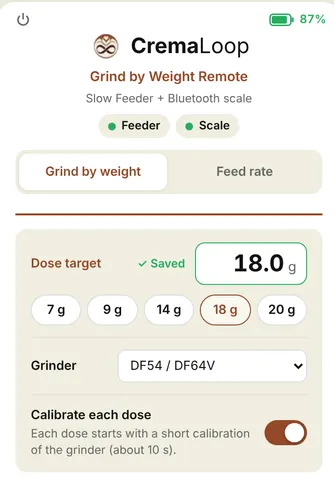
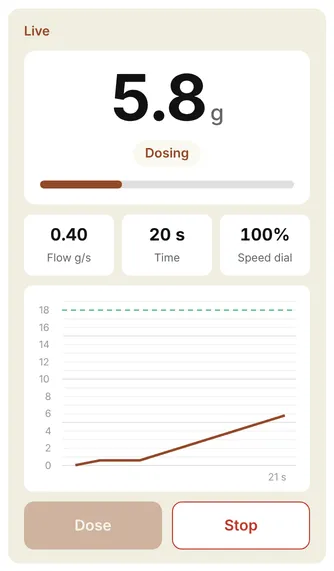
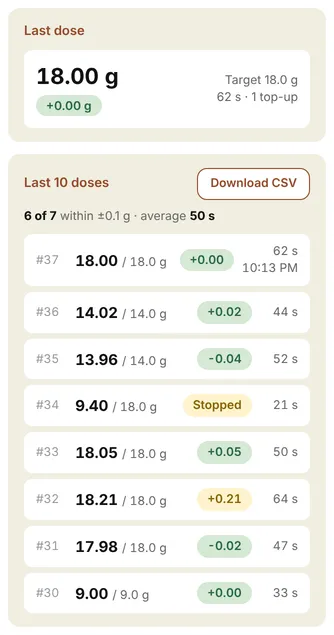
Your grinder: pick it once; it is remembered for this feeder. If it isn’t listed, choose Other and type the model.
Faster doses: each dose starts with a short grinder calibration (about 10 s). If you keep the same grinder, beans and grind size, switch Calibrate each dose off. Switch it back on after changing any of them.
If something goes wrong
Section titled “If something goes wrong”The feeder doesn’t find the scale (three quick flashes). Wake the scale, close the scale’s app (BOOKOO or Acaia) on every phone, check the scale battery, then press 3 times. An Acaia must be set to grams: in ounces it connects but shows no weight.
The phone page can’t find “CremaLoop”. Switch grind-by-weight mode on first (3 presses, or the power-on gesture on Metal Wave 1 & 2): Bluetooth is off otherwise. Use Chrome or Bluefy, not Safari or Firefox. Only one phone can connect at a time.
The target is far too high. It was learned without taring the cup. Tare first, or set it on the phone page.
The dose lands a bit over. Lower the dial speed a little. If “Calibrate each dose” is off, switch it on for one dose.
The grinder switches off during a dose. Grinders with auto-off (e.g. Timemore, about 60 s) can stop during long doses. Use shorter doses or a grinder without auto-off.
An Acaia scale doesn’t work. Acaia support is experimental. Please tell us the scale model and what happened (connected? weight shown? dose accurate?).
Still stuck? Contact us with your feeder model, grinder and what the LED shows.
Slow Feeder Metal Wave 1 & 2
Section titled “Slow Feeder Metal Wave 1 & 2”Wave 1 & 2 have a power switch that cuts the power completely (even on the charger) and no button the firmware can read. They get their own beta, 1.4_GBW beta (stable v1.3 plus grind by weight). The dosing itself is the same as above: same accuracy logic, same phone page. Only the controls differ: everything the button does on Wave 3 is done with the power switch and the dial. Outside grind by weight the feeder behaves exactly like v1.3.
Install the Wave 1 & 2 beta
Section titled “Install the Wave 1 & 2 beta”Download and flash buttons, and the update steps, are in Install the beta firmware above: choose the Metal Wave 1 & 2 tab.
Switching grind by weight on and off
Section titled “Switching grind by weight on and off”-
Switch the feeder off and turn the dial to 0.
-
Switch it on, and within 4 seconds turn the dial up to 9 and back to 0. You can do it straight away: the 4 seconds count from switching on.
| LED | Meaning |
|---|---|
| 3 quick blinks | Grind-by-weight mode is on. The feeder searches for the scale (LED patterns as under More details). |
| 2 slow blinks | Grind-by-weight mode is off: normal v1.3 operation. |
The choice is remembered. Once on, every switch-on comes back in grind-by-weight mode: with the dial at 0 it first waits the 4 seconds (in case you’re doing the gesture), with the dial up it resumes at once. Resuming never starts the motor. To leave, do the same gesture again.
Dosing with the dial
Section titled “Dosing with the dial”| Dial | Result |
|---|---|
| At 0 | Ready. Nothing runs. |
| Turned up | Dose to the target. The position is the feed speed (minimum 60%). |
| Back to 0 during a dose | Stop, immediately. |
| Target reached | The dose stops by itself, even with the dial still up. |
| Next dose | Dial back to 0, then up again. |
- The dial has to visit 0 before every dose, so a dial left up never starts a dose by itself.
- Turned up before the scale is connected: nothing happens (2 short blinks). Turn back to 0, and up again once the scale is ready.
- Dose and Stop on the phone page work too.
Target, phone page and charging on Wave 1 & 2
Section titled “Target, phone page and charging on Wave 1 & 2”- Target: set it on the phone page, or on the Wi-Fi settings page
192.168.4.1/gbw(leave grind-by-weight mode first, then use the update sequence above). There is no double-press target learning without a button. - Phone page: where it says “press the button 3 times”, use the power-on gesture instead. Bluetooth only runs in grind-by-weight mode here too.
- Power button on the phone page: on battery the feeder switches off; switch it off and on with the power switch to come back. On the charger it leaves grind-by-weight mode instead.
- On the charger: grind by weight works. In normal mode the motor stays off while charging, as with v1.3. Plugging the charger in during a dose does not stop it on Wave 1 & 2.
- Auto-off: after 10 minutes without activity in grind-by-weight mode (not while charging). Switch off and on; it comes back in grind-by-weight mode.
- Wi-Fi update and maintenance mode don’t work in grind-by-weight mode (the dial starts and stops doses there). Leave grind-by-weight mode first.
Troubleshooting on Wave 1 & 2
Section titled “Troubleshooting on Wave 1 & 2”The gesture does nothing (no blinks). The dial wasn’t at 0 when you switched on, or the turn up to 9 and back to 0 took longer than 4 seconds or didn’t go all the way. Switch off, dial to 0, switch on, and turn up and back in one smooth movement.
Turning the dial doesn’t start a dose. It has to come from 0: turn it to 0, then up. If the scale isn’t connected yet (short flash every 0.5 s), wait until the LED is solid with a blip.
The motor doesn’t run in normal mode. The charger is connected: the motor is off while charging, as with v1.3. Unplug it.
More details
Section titled “More details”All LED patterns
| LED | Meaning |
|---|---|
| Short flash every 0.5 s | Looking for the scale |
| Three quick flashes, then a pause | No scale found: wake the scale, press 3 times to retry |
| Solid with a short blip every 2 s | Ready |
| Fast flashing | Zeroing the scale (start of a dose) |
| Solid | Dosing |
| Double blip every 2 s | Dose done |
| 3 blinks | New target saved |
| 2 blinks at the end of a dose | Dose within ±0.3 g |
| 5 blinks at the end of a dose | Dose more than 0.3 g off |
| 4 fast blinks | Dose stopped (button or dial, empty hopper, jam, lost scale…) |
| Fast steady flashing (3 per second) | Feed-rate run in progress (phone page) |
| Two short blinks | Dial at 0 (Wave 1 & 2: scale not ready): the feeder will not dose |
What happens during a dose
- Zeroing: the feeder tares the scale and waits for a steady zero.
- Calibrating: it feeds slowly until the first 0.6 g arrives, pauses, and measures how much keeps coming out and how long it takes. Skipped for doses under 4 g, or when “Calibrate each dose” is off and a calibration is saved.
- Main feed at dial speed.
- Slowing down early, based on what is still inside the grinder, and finishing in short pulses.
- Stopping a little short on purpose, waiting for the scale to settle, then topping up in short pulses until it is within 0.1 g.
When a dose stops by itself
A dose stops on its own (4 fast blinks) when:
| Reason | What to do |
|---|---|
| Button pressed, dial turned to 0 (Wave 1 & 2) or Stop on the phone page | - |
| No weight increase for 8 s | Hopper empty, or beans not reaching the grinder |
| Jam that 10 automatic unjam attempts can’t clear | Check hopper and burrs |
| Scale connection lost or scale reading frozen | Check the scale (battery, distance, the scale’s app) |
| Dose takes longer than 3 minutes | Raise the dial speed; check for a blockage |
| Charger cable plugged in during a dose and left in for 2 s (not on Wave 1 & 2) | Start the dose again; it works on the charger |
Very rarely the scale sends one wrong reading, which can end a dose early, more often with a low scale battery. Charge the scale and dose again.
More about the phone page
- Top bar: power button (top left), feeder battery (top right), status chips for feeder and scale.
- Feed rate view: runs the feeder continuously at dial speed and shows the feed rate in g/s, live, averaged, and as a 60-second graph. Useful for comparing dial positions or grinders. A run stops by itself after 5 minutes.
- Last 10 doses: error shown green within ±0.1 g, amber within ±0.3 g, red beyond. Stopped doses are marked “Stopped”.
- Download CSV: every dose in the history with its weight curve. Columns:
dose, result, target_g, final_g, error_g, total_s, top_ups, curve_source, time_s, weight_g. Doses watched live on the page have 5 samples per second (curve_source = page), others come from the feeder at 2 samples per second (feeder). The feeder keeps curves only until it is switched off; older doses export without a curve (none). Times of day are only known for doses the page watched live. - Power button: tap once, then “Tap again to switch off” within 3 s. Press the feeder button to wake it (Metal Wave 1 & 2: switch it off and on with the power switch).
- The page can’t switch the feeder into or out of grind-by-weight mode: that’s the 3 presses on the feeder (the power-on gesture on Metal Wave 1 & 2).
Wi-Fi settings page (advanced)
In Wi-Fi update mode (5 presses, Wi-Fi CremaLoop-XXXX, password cremaloop2025) open 192.168.4.1/gbw. On Metal Wave 1 & 2, leave grind-by-weight mode first and start Wi-Fi update mode with the dial sequence from Install the beta firmware.
| Setting | Meaning | Default |
|---|---|---|
| Target | Dose target in grams (1 to 60 g) | 14 g |
| Slow from | Fallback slow-down distance before the target, used only when the automatic grinder measurement fails | 1.0 g |
| Slow speed | Speed of the slow final approach | 60% |
Most users should only change the target here. Raise Slow speed if the disc stalls at the end of a dose.
Battery, Bluetooth and charging
- Bluetooth is only on in grind-by-weight mode. In normal mode and when switched off it is fully off, so normal use costs no extra battery.
- Auto-off: 10 minutes without activity in grind-by-weight mode (3 minutes in normal mode). Not while charging.
- Grind by weight works normally on the charger. Plugging the cable in during a dose stops that dose (after 2 s); start it again. Unplugging changes nothing. Metal Wave 1 & 2 differ, see their section.
- Switching off from the phone page while on the charger leaves grind-by-weight mode and shows the charging light instead.
- The LED keeps the grind-by-weight patterns on the charger, so the dose feedback stays visible.
- In normal mode on the charger, the beta’s button glows slowly while charging and goes off when the battery is full (stable firmware does the same from build 2.2.7).
- Power-on never starts the motor on the beta, so beans never fall into the grinder before grind by weight is on.
- Presses are read about half a second after the last one, so a single press responds with a short delay. This keeps 2 and 3 presses from being misread.
- Grinder auto-off control (SwitchBot) is in the firmware but has no customer setting yet.
Known limitations of the beta
- Tested only with BOOKOO Themis / Themis Mini. Acaia support is experimental until confirmed on real Acaia scales: if you try one, please tell us the model and whether it connected, showed the weight and dosed accurately.
- No filter yet for the scale’s occasional single wrong reading (can end a dose early).
- Weight curves for the CSV are kept by the feeder only until it is switched off.
- Grinder auto-off control (SwitchBot) has no customer setting yet.
- iPhone / iPad need the Bluefy browser for the phone page.
- The phone page can’t switch the feeder into or out of grind-by-weight mode.
- Not available for the Slow Feeder Pro V1.
- Metal Wave 1 & 2 (1.4_GBW beta): no double-press target learning, and tested on Wave 1 so far (Wave 2 has the same electronics).